
Famer / Sports Coaching Platform

Video library feature redesign for a sports coaching platform

Redesigning the upload flow, the visibility logic, and the filtering system of a video library for coaches, clubs, and athletes.

  • Admins couldn't tell who would see a video after uploadVisibility set during upload and changed from the library, without opening the drill
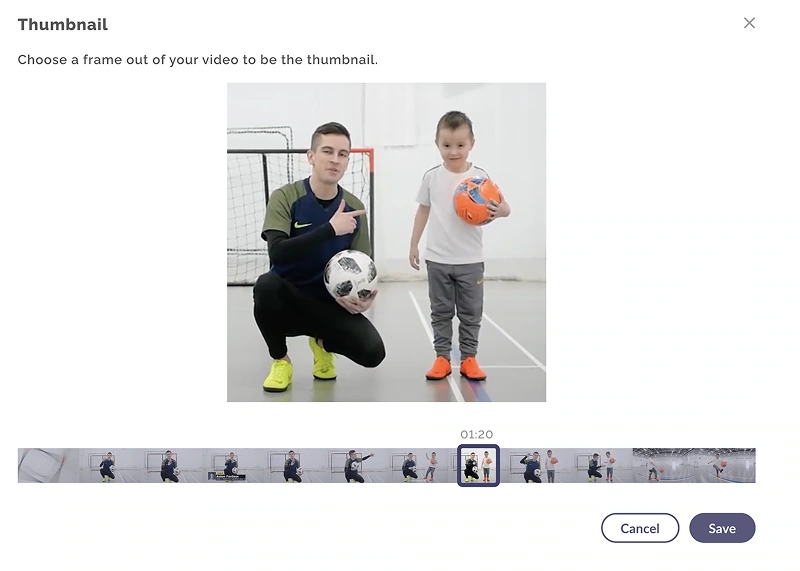
  • Every drill card looked the sameA thumbnail chosen from a frame of the video
  • Live sessions and drill videos in the same spaceLive recordings in a tab of their own
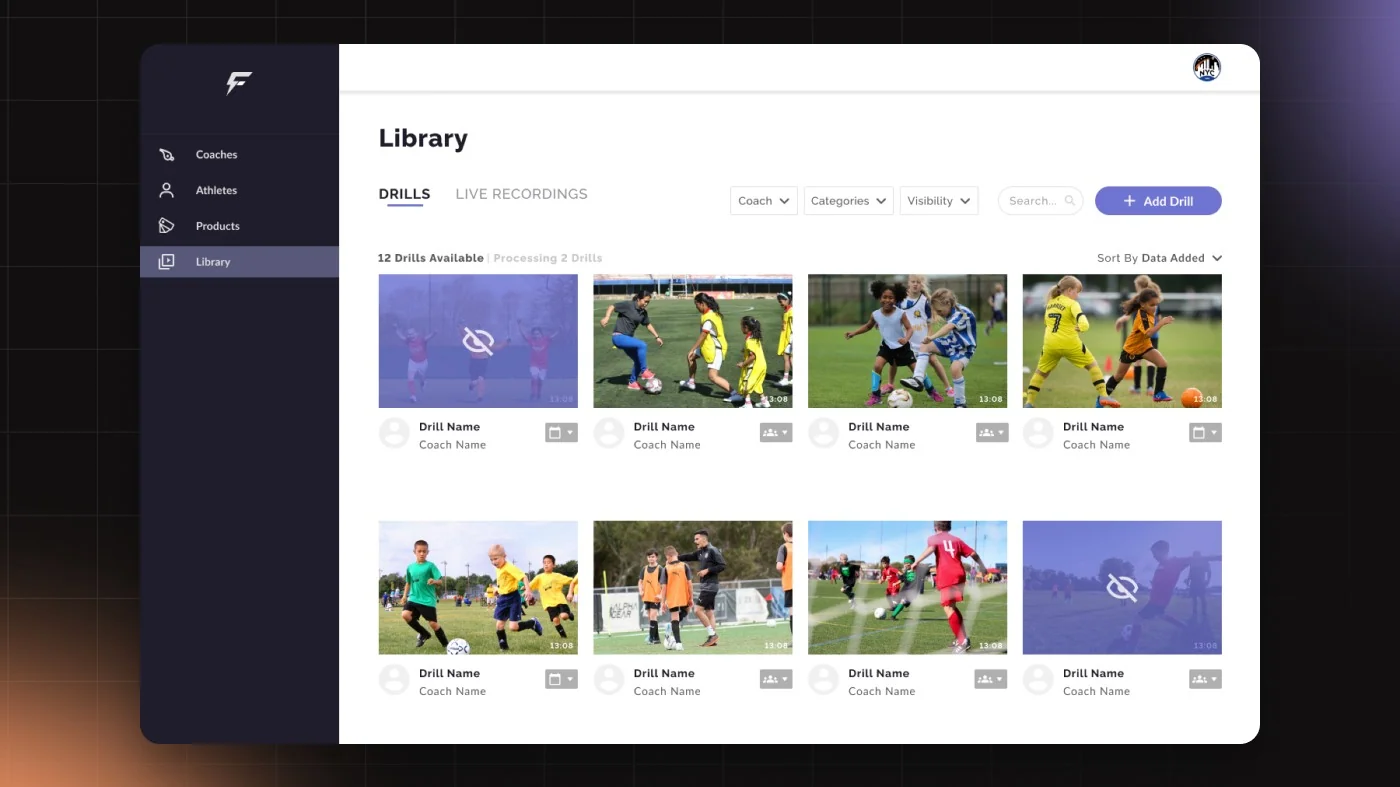
The Library screen of the Famer coaching platform on a dark grid background: twelve drill thumbnails in four columns, two of them hidden behind an eye-off overlay, with the Coach, Categories and Visibility filters above
Company
Famer
Product
Sports Coaching Platform
Type
B2B2C
Role
Product Designer
Duration
About 3 months
Overview

As the sole designer, I redesigned how coaches upload, share, and find drills.

Famer is a sports coaching platform connecting athletes, coaches, and clubs through personalized training programs and interactive feedback.

Problem

The system was designed for one video at a time.

COVID changed that overnight: clubs moved online, coaches needed to upload dozens of drills a week, and a system built for single uploads with no visibility logic couldn't keep up.

Visibility

Admins couldn't tell who would see a video after upload.

Thumbnails

With no custom thumbnail, every drill card looked the same, no way to tell them apart.

Structure

Live sessions and drill videos lived in the same space, no structure to separate them.

Findability

With dozens of new drills a week, there was no way to find anything.

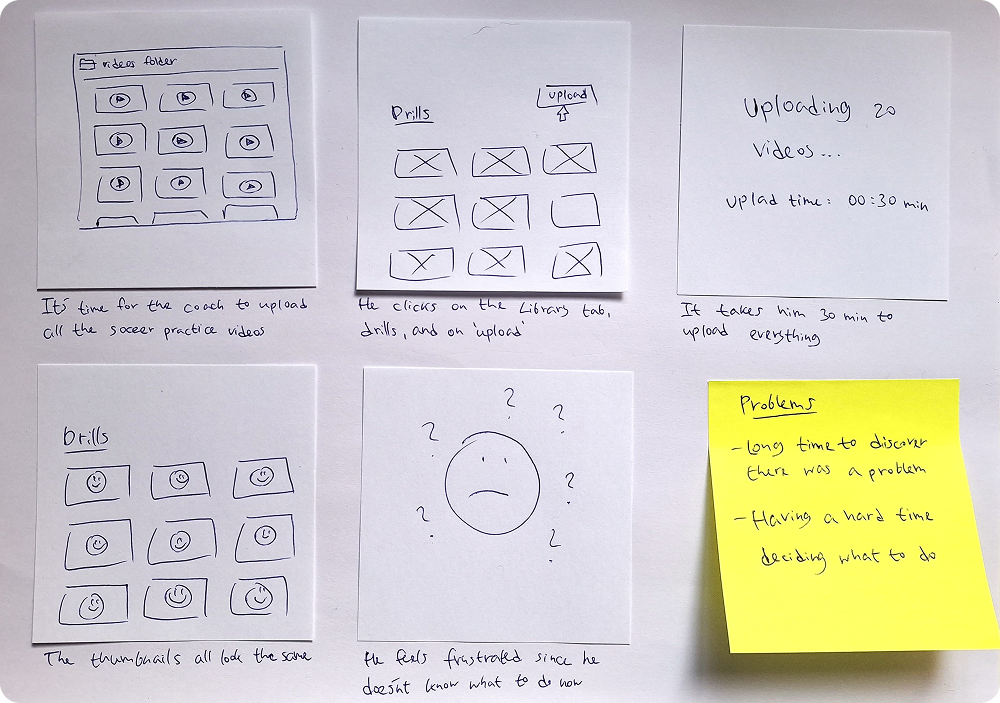
A hand-drawn storyboard in six panels: a coach with a folder of videos, the Library tab and Upload button, uploading 20 videos taking 30 minutes, every thumbnail the same, a frustrated face, and a yellow note listing the problems
The storyboard: a coach uploads twenty videos and every thumbnail looks the same.
Process

Before screens, requirements.

I wrote the full product requirements with the PM: visibility states, coach permissions, and content types. Working with PM, QA, and developers, I mapped the full admin experience before designing anything.

Identical thumbnails

No way to tell drills apart at a glance.

No privacy standard

Every platform solved visibility differently.

All content, one place

No structure to separate them.

Users

Every visibility decision the admin makes ripples down to coaches and athletes.

Club Manager persona
Upload

Club Manager (Administrator)

Uploads dozens of drills a week across multiple teams, and needs to control who sees what, without it becoming a full-time job.

Challenges
  • Uploading in bulk with no way to verify who can access what
  • Visibility settings that required figuring out, no time for that
  • Videos from the same session looked identical
"I need a way to upload and manage drills and share them with athletes."

Coach persona
Share

Coach

Needs to find the right drill clip and assign it to the right athlete, before Friday's session, not after.

"I want to have my video library so I can easily share drills with my athletes."
Athlete persona
Play

Athlete

Looking for their own performance footage, can't find it among content they don't have access to.

"I want to watch videos that are personalized to me, whenever I want."
Key decisions

Every upload field had to help users tell videos apart.

I talked with users, watched how they used the library, and looked at competitors' references to see what helps them tell one video from another. What helps them is the image, the name and the coach. That decided what is required at upload, what is optional, and which details become filters in the library.

Three visibility states, not a toggle.

A toggle works for two states. Here there were three distinct permission levels: all athletes, after assignment, or hidden. A binary on/off would have forced admins to use workarounds for every non-standard case.

  • All athletesEvery athlete can see it
  • After assignmentOnly athletes a coach assigned it to
  • HiddenNot shown to athletes

Tags and categories together. Search alone doesn't scale. Tags handle specifics, categories handle browsing, both serve different moments in the admin's workflow.

Design

No second step, no going back to edit after the fact.

All drill details are set during upload: visibility, sport, category, coach, tags, and thumbnail.

Thumbnail

Dozens of drills with the same default thumbnail, no way to tell them apart. Admins choose a frame from the filmstrip directly in the upload flow, making each card visually distinct.

The Thumbnail dialog: choose a frame out of your video to be the thumbnail, a coach and a boy with soccer balls, and a filmstrip below with the frame at 01:20 selected
The uploader chooses a frame from the video as its cover.

Upload and visibility flow

  1. Login
  2. Goes to Library tab
  3. Clicks on Add Drill
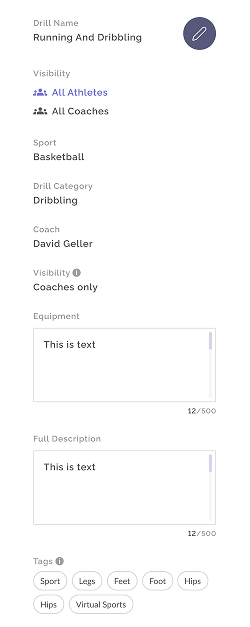
  4. Sets up drill settings: visibility and coach assignment in one step
  5. Uploads video

Drill settings

The drill settings panel: Drill Name, Visibility, Sport, Drill Category, Coach, Equipment, Full Description and Tags, all in one panel
  • Visibility. Who can watch is chosen here, in the same step as the upload.
  • Coach. With the name and the image, what users tell videos apart by.
  • Tags. Added now, so the video can be found later.

Library

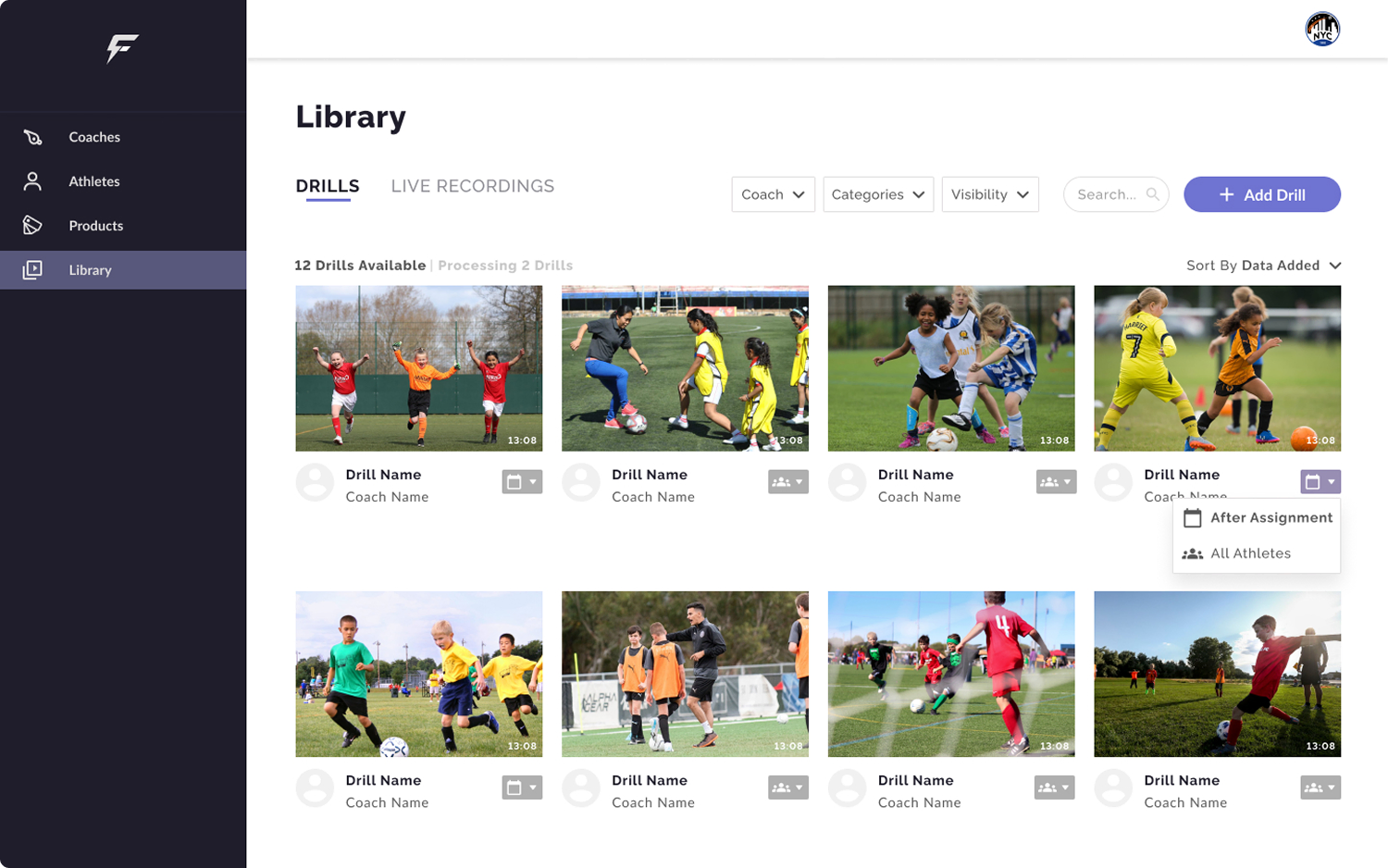
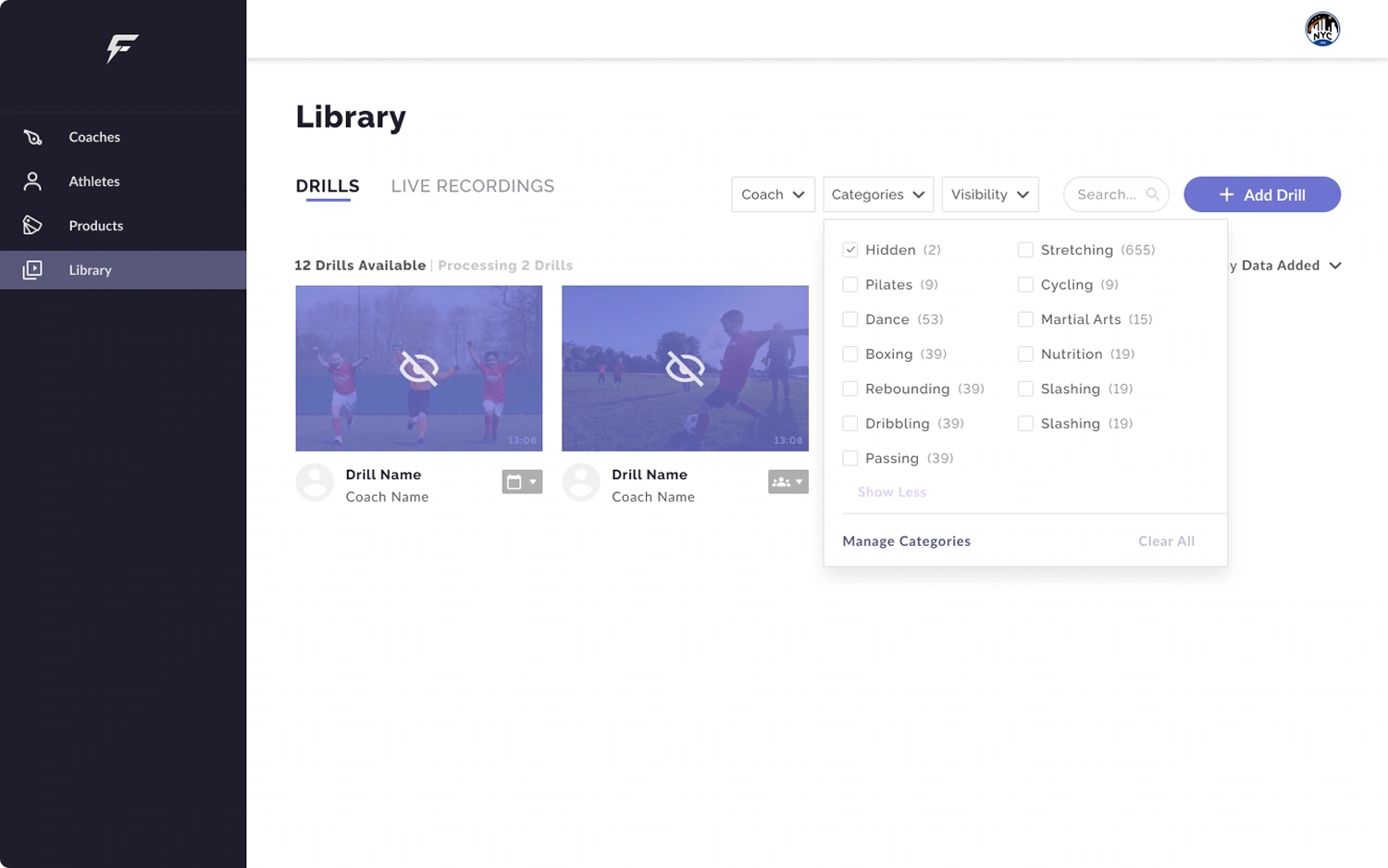
After upload, admins can change a drill's visibility directly from the library, without opening it. The eye-off overlay makes hidden drills immediately visible in the grid.

The Library, Drills tab: twelve drills in four columns, with the visibility menu open on one drill showing After Assignment and All Athletes
Changing visibility from the library
The Library with the Categories filter open: Hidden is checked, and two hidden drills show the eye-off overlay
Filtering by category and visibility

Live recordings

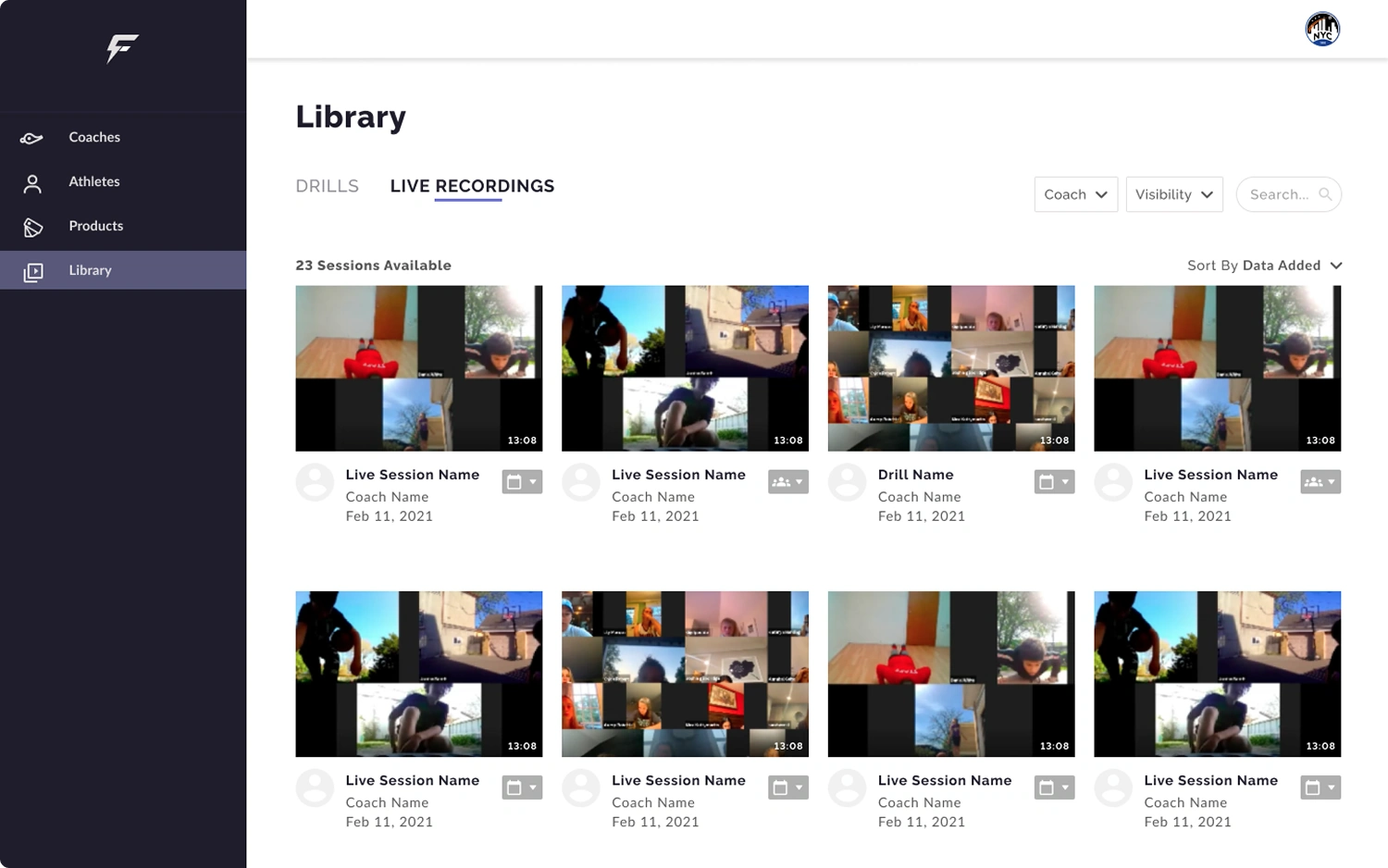
Live recordings have their own structure: coach, participants, date, and view mode (Speaker / Gallery). Separating them from drills gave clubs running weekly remote sessions a dedicated home in the system.

The Library, Live Recordings tab: 23 sessions with video call thumbnails, coach name and date, and the Coach and Visibility filters
Live recordings in their own tab: coach, participants, date and view mode.
Results

Easier to upload videos, and to tell them apart

The new video library is live and in use. Club managers and coaches, who upload the training videos, said it was easier and more convenient to upload them and to tell one video from another.

Many videos in one flow

Before, uploading a batch of videos took several steps with no clear logic. Now it is one flow, and who can watch each video is chosen in the same step, so there is no going back to fix it later.

Every drill recognizable at a glance

Before, every drill looked the same in the list. The uploader now chooses a still image from the video as its cover, so each drill has a cover of its own.

Live sessions in their own place

Recordings of live sessions now have their own tab, apart from the training videos.

What I learned

I'd split visible and hidden drills at the page level, not control each drill.

A per-item control works when the library is small. At scale, the cognitive load adds up fast.

I'd also replace the single upload form with a step-by-step flow.

One decision at a time instead of all settings at once. When admins are uploading dozens of videos, a long form creates friction at exactly the wrong moment.

Scroll up